
Keyboard shortcuts & the command palette
Every keyboard shortcut in the app, and the ⌘K palette that jumps anywhere, searches everything and asks Zoe
Exponential has a small set of shortcuts that work everywhere, a few that belong to one screen, and a command palette that does the rest: press ⌘K (Ctrl+K on Windows and Linux), type, and you can open any page, find any project, action or goal, or hand the question to Zoe.
Where to find it
The shortcuts are always on; nothing to enable. This page is the only list.
Everywhere
| Keys | What it does |
|---|---|
| ⌘K | Open the command palette |
| ⌘N | Create an action (the same dialog as Create Action at the top of the sidebar) |
| ⌘J | Open or close the Zoe drawer |
| Esc | Close the palette, a drawer or a dialog |
| ⌘Enter | Send a comment or an update from any activity thread |
On a Mac ⌘ is the Command key; elsewhere use Ctrl.
The command palette
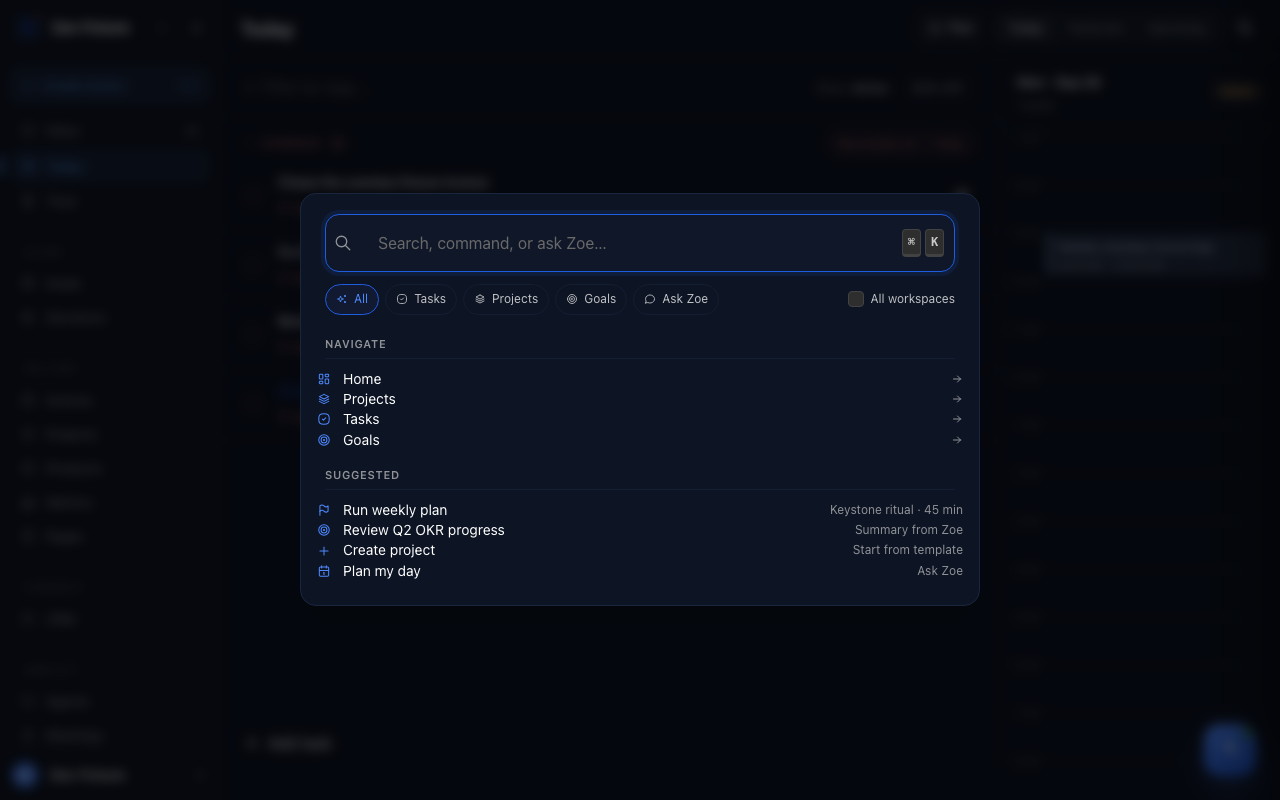
Press ⌘K. The palette has five modes along the top: All, Tasks, Projects, Goals and Ask Zoe.
- Type to search. Results are grouped by kind; ↑ and ↓ move, Enter opens. The search covers projects, actions, goals, workspaces and more, the same coverage as
exponential searchon the command line. - Type a page name (Home, Projects, Tasks, Goals) to jump to it in the current workspace, or a workspace's name to jump into one of its sections (Home, Goals, Projects, Products, Agent, Knowledge, Meetings, and on the desktop, Local wiki).
- Switch to Ask Zoe (or start the query in that mode) to send what you typed to Zoe; her answer opens in the drawer.
On particular screens
| Where | Keys | What it does |
|---|---|---|
| Lists with a search box (projects and their Timeline, goals, pages, CRM contacts) | ⌘F | Focus the list's search |
| Docs (this site) | / | Open docs search |
| Daily plan, "Fill task list" step | A, Esc | Open and close the add box |
| Weekly plan, a project's review card | S | Mark the project reviewed |
| Kanban boards and other drag-and-drop lists | Space, then ↑ ↓ ← →, Space again | Pick up, move and drop an item without a mouse; Esc cancels |
| Dialogs with a single field | Enter | Submit |
How it connects
- Zoe — the drawer behind ⌘J and the palette's Ask Zoe mode: Zoe.
- Actions — what ⌘N creates: Actions.
- Daily plan and Weekly plan — the screens with their own keys: Daily plan, Weekly plan.
- CLI — the palette's search is the same search the CLI exposes: CLI reference.
FAQ
Can I change the shortcuts? Not yet.
Are there Vim-style keys for lists? No. Lists use the arrow keys; ↑ ↓ in the palette, and the Space-plus-arrows sequence on drag-and-drop boards.
⌘K opens my browser's search instead. Click inside the page first so the app has focus; some browsers reserve the shortcut until the page is active.