
Decisions
The Decision Log: every choice your workspace made, where it came from, what it replaced and what implements it, beside the ADRs in your repositories
A decision is a recorded choice: one line saying what was decided, the context and alternatives behind it, who decided and when, and where it came from, whether a meeting, a person, or an agent. The Decision Log keeps them beside the architecture decision records (ADRs) of the repositories your workspace tracks, so "why did we do it this way?" has one answer for product and engineering alike. An open question is simply a decision that has not been made yet.
Where to find it
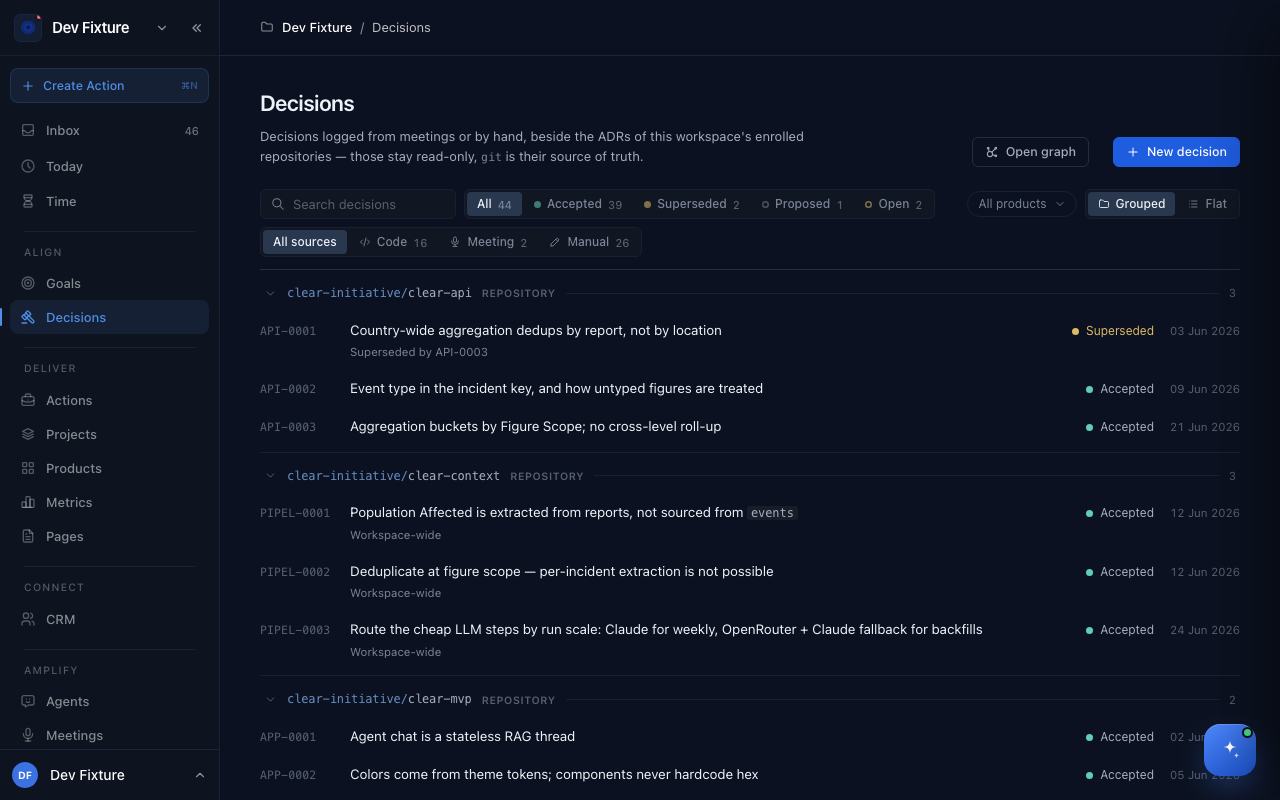
Align → Decisions in the sidebar. Each product also has a Decisions tab scoped to it, and each meeting's Decisions tab shows what that meeting produced. ADR sync is configured at workspace settings → Decisions.
How to read the log
- Filter by status: All, Accepted, Superseded, Proposed, Open.
- Filter by source: Code (ADRs projected from git, read-only), Meeting (extracted from a transcript), Manual (logged by hand or by an agent).
- Grouped puts decisions under their repository, ceremony or project; Flat is one list. All products narrows to one product.
- Search matches statements and bodies.
Decisions are numbered from a workspace sequence (D-0042); ADRs keep their repository's prefix (API-0003). When two ADRs claim the same number the group shows a conflict badge.
How to log a decision
- Click New decision.
- Write the Decision in one line, pick its status (Accepted, Proposed, or Open question for something still to decide) and the Decided date.
- Fill in the body under the headings the editor offers: Context, Alternatives considered, Consequences. Preview renders it.
- Click Log decision.
The decision's page shows the statement, who decided (Deciders, Owner) and where (the ceremony or meeting), the Evidence quotes, the body, and four controls:
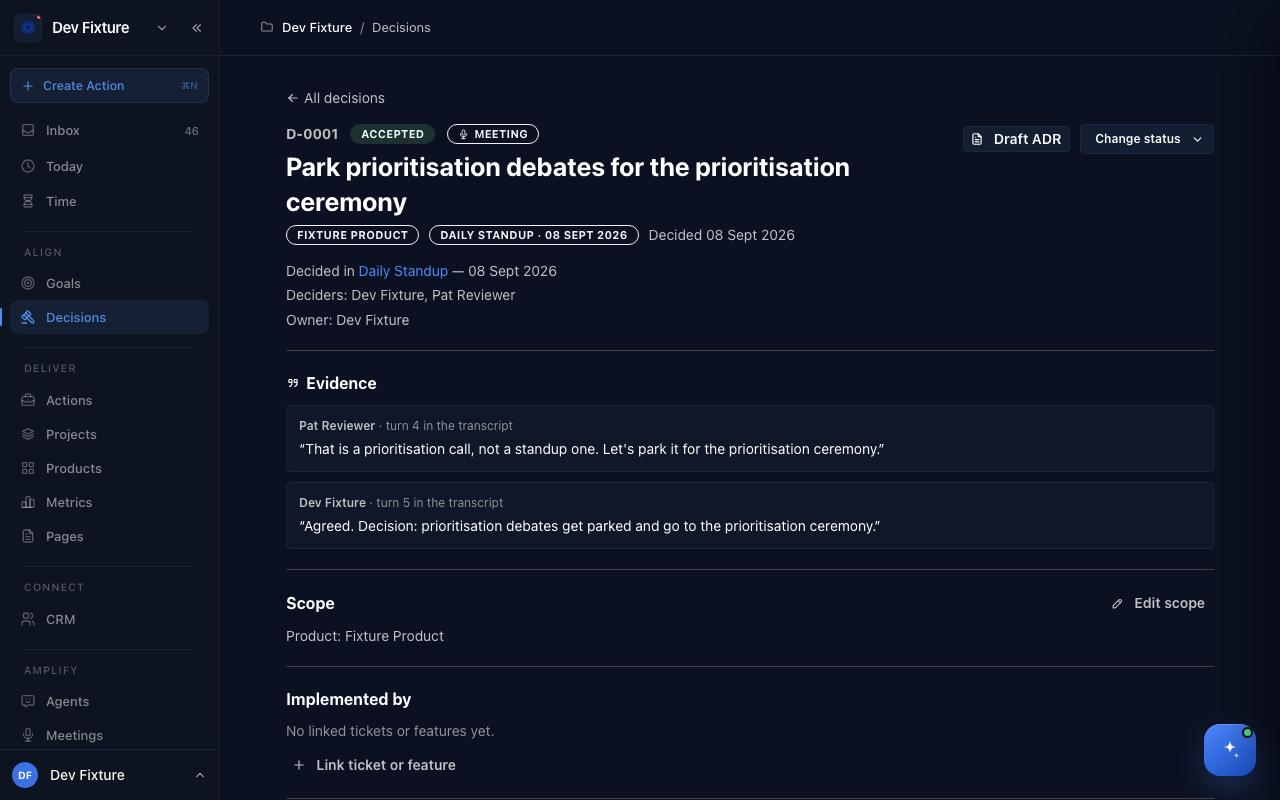
- Change status — move it through the lifecycle below.
- Edit scope — attach it to a Product, Project, Objective or Key result.
- Link ticket or feature — record what implements it.
- Draft ADR — turn it into an architecture decision record for a repository.
How decisions come from meetings
Open a meeting's Decisions tab and click Extract decisions & questions. Zoe drafts candidates from the notes and transcript, each with the quoted turns it rests on; a candidate with no evidence is discarded, never published. Review the drafts with Zoe, confirm the real ones and reject the rest. Only confirmed decisions reach the log, with the meeting and the quotes as their provenance. See Meetings.
How the lifecycle works
Open (a question) → Proposed → Accepted → Superseded or Deprecated. Superseding records the newer decision on the older one (Superseded by), so the chain stays readable. Use Change status on the decision's page; superseded and deprecated are reached from there, never at creation.
How to see the graph
Open graph draws both sources in two views: a Timeline (time left to right, one lane per repository, ceremony or project; Today marked; undated items parked at the end) and a relationship view showing supersedes, mentions (detected) and formalised as ADR links. Click a decision to open it; use Fit to width and the zoom controls to move around.
How to sync ADRs from git
- Track the repositories under Settings → Integrations → GitHub Repositories (this needs the GitHub App installed by an administrator); see GitHub, Google & Monday.com.
- Open workspace settings → Decisions and enrol the repositories whose
docs/adrfiles should appear. - ADRs are projected read-only; git stays the source of truth. Their content becomes readable by every workspace member, including people without access to the repository on GitHub, so enrol deliberately.
How it connects
- Meetings — the main source of decisions: Meetings.
- Ceremonies — a ceremony's occurrences collect the decisions made in them; grouped view shows decisions under their ceremony.
- Products — tickets and features implement decisions: Products.
- Goals — decisions can be scoped to an objective or key result: OKRs.
- CLI —
exponential decisionslists, logs, links and moves decisions, includingdecisions draft extractfor meetings.
FAQ
Can I edit an ADR here? No. ADRs are read-only projections of files in git; change the file in the repository.
Who can log decisions? Workspace members. Drafts an agent proposed are visible only until someone confirms or rejects them.
What is the difference between an open question and a proposed decision? An open question has no answer yet; answering it turns it into a decision. A proposed decision is a specific answer awaiting acceptance.