
Goals
Set the outcomes you are working toward, give each one an owner and a period, and connect the projects that deliver it
Goals are the outcomes you are working toward. Each goal has an owner (the DRI), a period, a health, and the projects that execute it. Team and organisation workspaces use OKR vocabulary: a goal is an Objective and carries measurable Key Results.
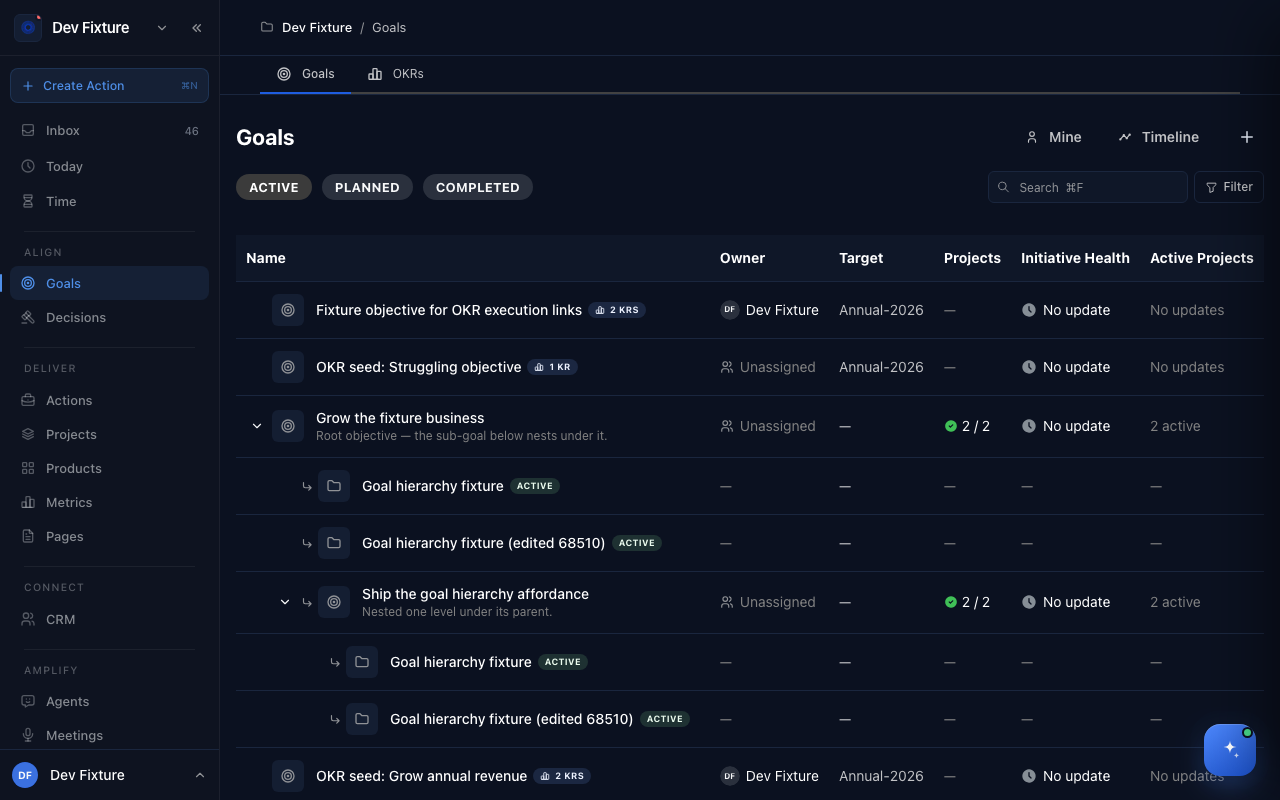
Where to find it
Open Goals — or Align → Goals in the sidebar. The page has two tabs: Goals (this page) and OKRs.
How to create a goal
- Click + at the top right of the Goals tab.
- Type the goal in the What's your goal? field.
- Pick a DRI — the directly responsible individual. This is required.
- Open More details if you want to set a Status (Planned, Active, Completed, Archived), a Parent goal to nest under (up to 5 levels), Why this goal?, a Due date, a Period such as Q1 2026 or Annual 2026, a Project, or Notes. In a team workspace you can add key results here too.
- Click Create Goal.
In a team workspace the same form says objective wherever this page says goal.
How to find a goal
- Switch between Active, Planned and Completed with the pills above the list.
- Type in Search (⌘F) to filter by name.
- Click Filter to narrow by Target period, Health or Owner.
- Click Mine to show only goals you are the DRI on.
- Click Timeline to see the same goals laid out by period instead of as a list.
- Click the arrow beside a goal to expand its sub-goals and projects.
How to work on a goal
Click a goal to open its page. It has Overview, Activity and Projects tabs, a Features tab when the Product Management plugin is on, and a settings tab (the gear).
- Overview shows sub-goals, the owner, the period and progress. Click the status badge to move the goal between Active, Complete and On Hold. Progress comes from key results; Manual progress lets you type a percentage, Revert to auto (key results) undoes that.
- Activity is where health lives. Choose Update, pick On track, At risk or Off track, and write what changed. The latest update is the goal's Initiative Health in the list (No update until then). Comment is for discussion that does not change health.
- Projects lists the projects delivering the goal. Link a project to a goal from the project form's Link to Goals (Objectives) field.
How it connects
- OKRs — the OKRs tab on the same page adds measurable key results to each objective and tracks them by quarter.
- Projects — a project can serve several goals; the goal's Projects tab and Active Projects column show them.
- Weekly plan — review your goals and check in on key results each week.
- Wheel of Life — a life assessment that points at the areas worth a goal.
Tips
- Give every goal a Period. Goals without one show No target and sit outside the timeline.
FAQ
Why does my workspace say "Objective" instead of "Goal"? Personal workspaces use plain language (goals). Team and organisation workspaces use OKR language (objectives and key results). They are the same object.
Can I file a goal under a life domain? Not from the goal form. The OKRs tab can group objectives by life domain, and a project can be tagged with life domains from the project form.
What happens when a goal is done? Set its status to Complete on the goal page; it moves from Active to Completed.